DotNetCore.CAP 10.0.0-preview-280318356

CAP 中文





CAP is a .NET library that provides a lightweight, easy-to-use, and efficient solution for distributed transactions and event bus integration.
When building SOA or Microservice-based systems, services often need to be integrated via events. However, simply using a message queue cannot guarantee reliability. CAP leverages a local message table, integrated with your current database, to solve exceptions that can occur during distributed system communications. This ensures that event messages are never lost.
You can also use CAP as a standalone EventBus. It offers a simplified approach to event publishing and subscribing without requiring you to inherit or implement any specific interfaces.
Key Features
Core Functionality
- Distributed Transactions: Guarantees data consistency across microservices using a local message table (Outbox Pattern).
- Event Bus: High-performance, lightweight event bus for decoupled communication.
- Guaranteed Delivery: Ensures messages are never lost, with automatic retries for failed messages.
Advanced Messaging
- Delayed Messages: Native support for publishing messages with a delay, without relying on message queue features.
- Flexible Subscriptions: Supports attribute-based, wildcard (
*,#), and partial topic subscriptions. - Consumer Groups & Fan-Out: Easily implement competing consumer or fan-out patterns for load balancing or broadcasting.
- Parallel & Serial Processing: Configure consumers for high-throughput parallel processing or ordered sequential execution.
- Backpressure Mechanism: Automatically manages processing speed to prevent memory overload (OOM) under high load.
Extensibility & Integration
- Pluggable Architecture: Supports a wide range of message queues (RabbitMQ, Kafka, Azure Service Bus, etc.) and databases (SQL Server, PostgreSQL, MongoDB, etc.).
- Heterogeneous Systems: Provides mechanisms to integrate with non-CAP or legacy systems.
- Customizable Filters & Serialization: Intercept the processing pipeline with custom filters and support various serialization formats.
Monitoring & Observability
- Real-time Dashboard: A built-in web dashboard to monitor messages, view status, and manually retry.
- Service Discovery: Integrates with Consul and Kubernetes for node discovery in a distributed environment.
- OpenTelemetry Support: Built-in instrumentation for distributed tracing, providing end-to-end visibility.
Architecture Overview
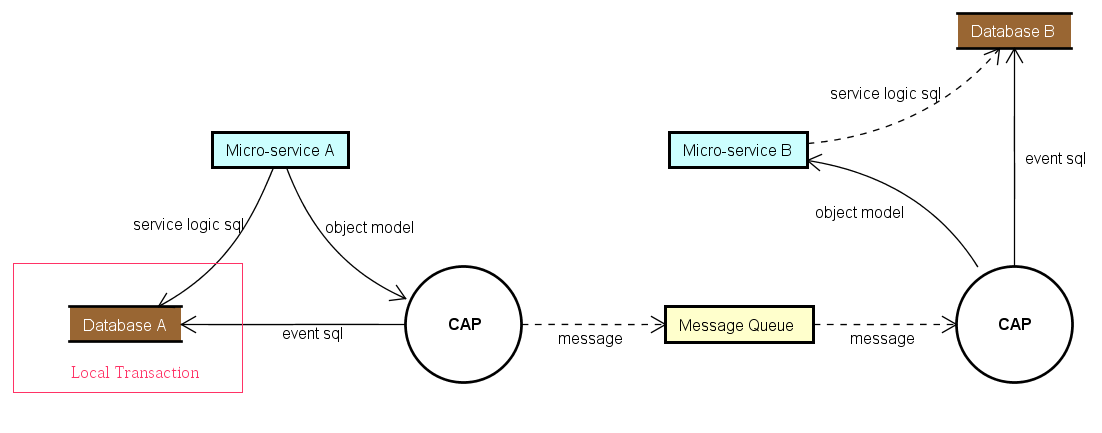
CAP implements the Outbox Pattern as described in the eShop on .NET ebook.
Getting Started
1. Installation
Install the main CAP package into your project using NuGet.
PM> Install-Package DotNetCore.CAP
Next, install the desired transport and storage providers.
Transports (Message Queues):
PM> Install-Package DotNetCore.CAP.Kafka
PM> Install-Package DotNetCore.CAP.RabbitMQ
PM> Install-Package DotNetCore.CAP.AzureServiceBus
PM> Install-Package DotNetCore.CAP.AmazonSQS
PM> Install-Package DotNetCore.CAP.NATS
PM> Install-Package DotNetCore.CAP.RedisStreams
PM> Install-Package DotNetCore.CAP.Pulsar
Storage (Databases):
The event log table will be integrated into the database you select.
PM> Install-Package DotNetCore.CAP.SqlServer
PM> Install-Package DotNetCore.CAP.MySql
PM> Install-Package DotNetCore.CAP.PostgreSql
PM> Install-Package DotNetCore.CAP.MongoDB     // Requires MongoDB 4.0+ cluster
2. Configuration
Configure CAP in your Startup.cs or Program.cs.
public void ConfigureServices(IServiceCollection services)
{
    // If you are using EF as the ORM
    services.AddDbContext<AppDbContext>();

    // If you are using MongoDB
    services.AddSingleton<IMongoClient>(new MongoClient("..."));

    services.AddCap(x =>
    {
        // Using Entity Framework
        // CAP can auto-discover the connection string
        x.UseEntityFramework<AppDbContext>();

        // Using ADO.NET
        x.UseSqlServer("Your ConnectionString");
        x.UseMySql("Your ConnectionString");
        x.UsePostgreSql("Your ConnectionString");

        // Using MongoDB (requires a 4.0+ cluster)
        x.UseMongoDB("Your ConnectionString");

        // Choose your message transport
        x.UseRabbitMQ("HostName");
        x.UseKafka("ConnectionString");
        x.UseAzureServiceBus("ConnectionString");
        x.UseAmazonSQS(options => { /* ... */ });
        x.UseNATS("ConnectionString");
        x.UsePulsar("ConnectionString");
        x.UseRedisStreams("ConnectionString");
    });
}
3. Publish Messages
Inject ICapPublisher into your controller or service to publish events. As of version 7.0, you can also publish delayed messages.
public class PublishController : Controller
{
    private readonly ICapPublisher _capBus;

    public PublishController(ICapPublisher capPublisher)
    {
        _capBus = capPublisher;
    }

    [Route("~/adonet/transaction")]
    public IActionResult AdonetWithTransaction()
    {
        using (var connection = new MySqlConnection(ConnectionString))
        {
            // Start a transaction with auto-commit enabled
            using (var transaction = connection.BeginTransaction(_capBus, autoCommit: true))
            {
                // Your business logic...
                _capBus.Publish("xxx.services.show.time", DateTime.Now);
            }
        }
        return Ok();
    }

    [Route("~/ef/transaction")]
    public IActionResult EntityFrameworkWithTransaction([FromServices] AppDbContext dbContext)
    {
        using (var trans = dbContext.Database.BeginTransaction(_capBus, autoCommit: true))
        {
            // Your business logic...
            _capBus.Publish("xxx.services.show.time", DateTime.Now);
        }
        return Ok();
    }

    [Route("~/publish/delay")]
    public async Task<IActionResult> PublishWithDelay()
    {
        // Publish a message with a 30-second delay
        await _capBus.PublishDelayAsync(TimeSpan.FromSeconds(30), "xxx.services.show.time", DateTime.Now);
        return Ok();
    }
}
4. Subscribe to Messages
In a Controller Action
Add the [CapSubscribe] attribute to a controller action to subscribe to a topic.
public class SubscriptionController : Controller
{
    [CapSubscribe("xxx.services.show.time")]
    public void CheckReceivedMessage(DateTime messageTime)
    {
        Console.WriteLine($"Message received: {messageTime}");
    }
}
In a Business Logic Service
If your subscriber is not in a controller, the class must implement the ICapSubscribe interface.
namespace BusinessCode.Service
{
    public interface ISubscriberService
    {
        void CheckReceivedMessage(DateTime datetime);
    }

    public class SubscriberService : ISubscriberService, ICapSubscribe
    {
        [CapSubscribe("xxx.services.show.time")]
        public void CheckReceivedMessage(DateTime datetime)
        {
            // Handle the message
        }
    }
}
Remember to register your service in Startup.cs:
public void ConfigureServices(IServiceCollection services)
{
    services.AddTransient<ISubscriberService, SubscriberService>();

    services.AddCap(x =>
    {
        // ...
    });
}
Asynchronous Subscriptions
For async operations, your subscription method should return a Task and can accept a CancellationToken.
public class AsyncSubscriber : ICapSubscribe
{
    [CapSubscribe("topic.name")]
    public async Task ProcessAsync(Message message, CancellationToken cancellationToken)
    {
        await SomeOperationAsync(message, cancellationToken);
    }
}
Partial Topic Subscriptions
Group topic subscriptions by defining a partial topic on the class level. The final topic will be a combination of the class-level and method-level topics. In this example, the Create method subscribes to customers.create.
[CapSubscribe("customers")]
public class CustomersSubscriberService : ICapSubscribe
{
    [CapSubscribe("create", isPartial: true)]
    public void Create(Customer customer)
    {
        // ...
    }
}
Subscription Groups
Subscription groups are similar to consumer groups in Kafka. They allow you to load-balance message processing across multiple instances of a service.
By default, CAP uses the assembly name as the group name. If multiple subscribers in the same group subscribe to the same topic, only one will receive the message (competing consumers). If they are in different groups, all will receive the message (fan-out).
You can specify a group directly in the attribute:
[CapSubscribe("xxx.services.show.time", Group = "group1")]
public void ShowTime1(DateTime datetime)
{
    // ...
}

[CapSubscribe("xxx.services.show.time", Group = "group2")]
public void ShowTime2(DateTime datetime)
{
    // ...
}
You can also set a default group name in the configuration:
services.AddCap(x =>
{
    x.DefaultGroup = "my-default-group";
});
Dashboard
CAP provides a real-time dashboard to view sent and received messages and their status.
PM> Install-Package DotNetCore.CAP.Dashboard
The dashboard is accessible by default at http://localhost:xxx/cap. You can customize the path via options: x.UseDashboard(opt => { opt.PathMatch = "/my-cap"; });.
For distributed environments, the dashboard supports service discovery to view data from all nodes.
- Consul: View Consul config docs
- Kubernetes: Use the
DotNetCore.CAP.Dashboard.K8spackage. View Kubernetes config docs
Contribute
We welcome contributions! Participating in discussions, reporting issues, and submitting pull requests are all great ways to help. Please read our contributing guidelines (we can create this file if it doesn't exist) to get started.
License
CAP is licensed under the MIT License.